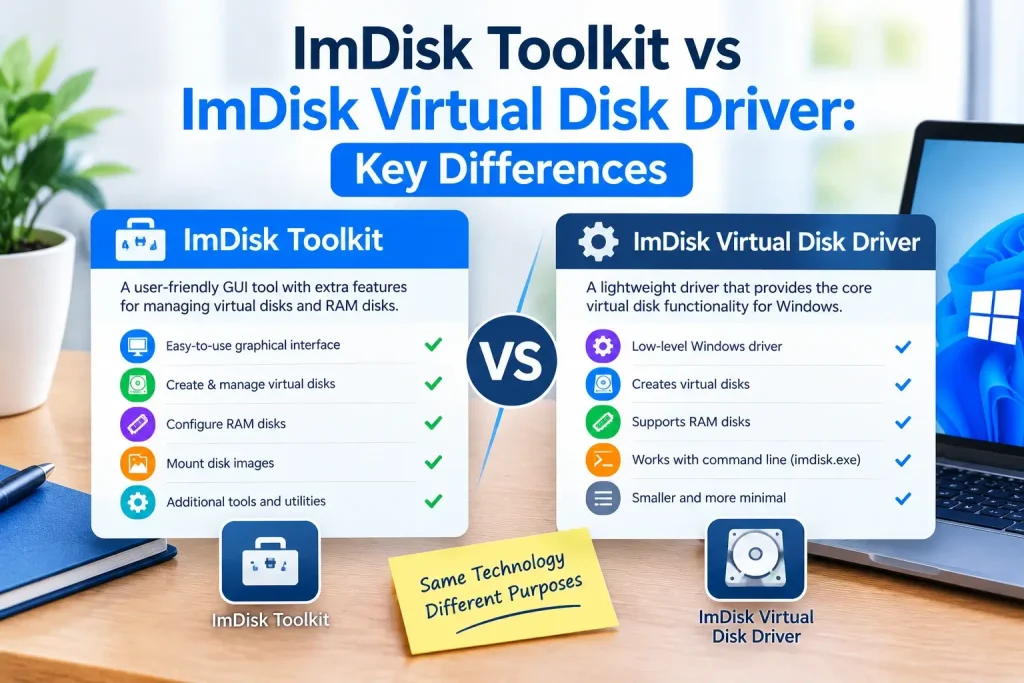
If you have searched for ImDisk Toolkit and ImDisk Virtual Disk Driver, it is easy to assume they are two names for the same program. They are closely related, but they are not the same thing.
ImDisk Virtual Disk Driver is the underlying Windows virtual disk technology. ImDisk Toolkit is a separate collection of graphical utilities built around ImDisk to make common tasks easier.
The original driver provides virtual disk functionality and the imdisk.exe command-line utility. The Toolkit adds a more convenient interface for jobs such as creating RAM disks and mounting disk image files.
This guide explains the differences between ImDisk Toolkit vs ImDisk Virtual Disk Driver, what each one does, how they relate to one another, their Windows compatibility, and which option makes more sense for your needs.
ImDisk Toolkit vs ImDisk: Quick Answer
The simplest way to understand the difference is:
ImDisk is the engine. ImDisk Toolkit provides additional controls around that engine.
If you need direct access to the virtual disk driver, command-line commands, or basic image mounting, the core ImDisk Virtual Disk Driver may be enough.
If you want an easier graphical interface for creating RAM disks and mounting images, ImDisk Toolkit was designed to simplify those tasks.
Here is the comparison at a glance:
| Feature | ImDisk Virtual Disk Driver | ImDisk Toolkit |
|---|---|---|
| Core virtual disk driver | Yes | Uses ImDisk |
imdisk.exe command-line utility | Yes | Can work with underlying ImDisk components |
| Virtual disk creation | Yes | Yes, through easier tools |
| RAM disk support | Yes | Yes |
| RAM disk GUI | Basic/core controls | More user-friendly |
| Image mounting | Yes | Yes |
| Multiple image-format workflow | More technical | Easier through Toolkit components |
| Explorer integration | Available | Extended workflow |
| Best for command-line users | Yes | Less necessary |
| Best for beginners | More technical | Usually easier |
| Separate project | Core project | Yes |
| Modern Windows limitations | Yes | Yes, with additional Toolkit-specific limitations |
What Is ImDisk Virtual Disk Driver?
ImDisk Virtual Disk Driver is the core software that creates virtual storage devices in Windows.
It can create virtual volumes backed by:
- system memory,
- disk image files,
- and redirected I/O.
Windows can then assign the virtual device a normal drive letter, such as:
R:V:X:
Depending on the configuration, ImDisk can be used for virtual hard-disk-style volumes, floppy-style devices, optical-media scenarios, RAM disks, and image-backed storage.
The core project includes several components.
imdisk.sys
imdisk.sys is the Windows kernel-mode virtual disk driver.
It provides the low-level functionality that allows ImDisk virtual devices to exist inside Windows.
imdisk.exe
imdisk.exe is the command-line management utility.
It lets you create, configure, query, and remove virtual disks from Command Prompt or scripts.
For example, a basic RAM-backed disk can be created with:
imdisk -a -s 2G -m R:You can later remove it with:
imdisk -D -m R:ImDisk Control Panel
The standard ImDisk installation also provides graphical controls, so using the command line is not mandatory.
However, the core interface is more technical than the experience provided by ImDisk Toolkit.
What Is ImDisk Toolkit?
ImDisk Toolkit is a separate set of utilities designed to make ImDisk easier to use.
Instead of requiring users to understand every command-line parameter, the Toolkit provides graphical tools for common virtual disk tasks.
It has historically been useful for:
- creating RAM disks,
- configuring RAM disk options,
- mounting disk images,
- assigning drive letters,
- configuring startup behavior,
- managing virtual disks,
- and working with several image formats.
The Toolkit relies on ImDisk technology rather than replacing the underlying concept of ImDisk.
This relationship is why users often confuse the two products.
Is ImDisk Toolkit the Same as ImDisk?
No.
They should not be treated as interchangeable product names.
ImDisk Virtual Disk Driver refers to the underlying driver and associated utilities maintained as the core ImDisk project.
ImDisk Toolkit is a separate project that packages additional interfaces and functionality around ImDisk.
A good comparison is a car engine and a dashboard.
The engine provides the fundamental capability. The dashboard gives the user a more convenient way to control it.
ImDisk is closer to the engine; Toolkit adds more user-friendly controls.
Who Develops ImDisk?
The original ImDisk Virtual Disk Driver is associated with LTR Data and its developer, Olof Lagerkvist.
The official source code is available through the LTRData/ImDisk GitHub repository.
That repository contains core project files such as:
- driver source code,
imdisk.exe,- installation definitions,
- helper components,
- API files,
- and technical documentation.
This is important when searching for phrases such as ImDisk GitHub, because the core LTRData repository is different from unrelated forks and third-party repositories.
Who Develops ImDisk Toolkit?
ImDisk Toolkit is a separate project distributed primarily through SourceForge.
This distinction matters when you search for:
imdisk toolkit downloadimdisk toolkit githubimdisk toolkit latest version
A GitHub repository with “ImDisk Toolkit” in its name should not automatically be considered the official Toolkit project.
For Toolkit information, the project’s established SourceForge pages are a more relevant reference.
ImDisk Toolkit Project Status
Another important difference is project status.
The core ImDisk driver has continued receiving maintenance, including a 2026 core driver release.
By contrast, the SourceForge page for ImDisk Toolkit currently identifies the Toolkit project as inactive and indicates that it has been superseded for modern use cases by AIM Toolkit.
That means users should not assume that:
newest ImDisk driver version = newest Toolkit version.
They are separate projects with different development histories.
This is particularly important for Windows 11 users.
ImDisk Toolkit vs ImDisk for RAM Disks
Both can be used to create a RAM disk.
The difference is mainly how you configure it.
Creating a RAM Disk With Core ImDisk
Advanced users can create a memory-backed virtual disk from the command line.
For example:
imdisk -a -s 2G -m R:You can then format it:
format R: /fs:ntfs /qThis approach is straightforward once you understand ImDisk commands.
It is also useful for:
- scripting,
- automation,
- repeatable test environments,
- and advanced configurations.
Creating a RAM Disk With ImDisk Toolkit
Toolkit provides a more graphical workflow.
Instead of constructing command-line parameters manually, users can select options such as:
- RAM disk size,
- drive letter,
- filesystem,
- startup behavior,
- and related configuration.
For someone new to RAM disks, this can be easier to understand.
Which Is Better for a RAM Disk?
Neither is automatically faster simply because of the interface you use.
Both ultimately rely on memory-backed storage functionality.
The main difference is convenience.
Choose core ImDisk if you want:
- command-line control,
- scripts,
- minimal additional software,
- or direct access to driver functionality.
Choose ImDisk Toolkit if you prefer:
- a graphical configuration process,
- easier startup configuration,
- or more convenient RAM disk management.
On newer Windows systems, however, Toolkit’s maintenance status and known compatibility limitations should be considered before making it part of an important workflow.
ImDisk Toolkit vs ImDisk for Mounting Disk Images
Image mounting is another area where the two overlap.
Core ImDisk can mount compatible image files as virtual volumes.
For example:
imdisk -a -f "C:\Images\disk.img" -m V:For safer inspection, an image can be mounted read-only:
imdisk -a -f "C:\Images\disk.img" -m V: -o roToolkit makes image mounting more accessible through graphical controls and additional image-handling workflows.
This is especially convenient if you regularly work with different virtual disk formats and do not want to configure command options manually.
What Image Formats Can ImDisk Toolkit Handle?
Toolkit documentation has historically listed support for several disk-image formats through its collection of tools and supporting components.
These have included formats such as:
- RAW or IMG images,
- ISO,
- VHD,
- VDI,
- VMDK,
- BIN,
- NRG,
- DMG,
- and certain SDI images.
However, this does not mean every format is handled directly by the ImDisk driver in exactly the same way.
Some formats require supporting utilities or conversion/handling layers.
This distinction is important because saying that “ImDisk natively supports every listed Toolkit format” would be misleading.
What Is “Mount as ImDisk Virtual Disk”?
The standard ImDisk installation can add Windows Explorer context-menu integration.
You may see an option such as:
Mount as ImDisk Virtual Disk
This provides a graphical shortcut for mounting an image without manually entering an imdisk.exe command.
Related Explorer commands can also include functions for:
- unmounting an ImDisk virtual disk,
- and saving disk contents to an image.
Therefore, you do not necessarily need Toolkit just to get a convenient image-mounting workflow.
Toolkit mainly extends and simplifies the overall experience.
ImDisk Toolkit vs Core ImDisk Commands
One of the biggest differences is how much command-line knowledge is expected.
With core ImDisk, common commands include:
Create a virtual disk
imdisk -a -s 1G -m R:Mount an image
imdisk -a -f "C:\Images\disk.img" -m V:Mount read-only
imdisk -a -f "C:\Images\disk.img" -m V: -o roRemove a virtual disk
imdisk -D -m R:Display ImDisk command help
imdiskToolkit hides much of this complexity behind graphical configuration.
That makes Toolkit easier for casual users, while the core utility is often more flexible for automation.
Which Is Easier for Beginners?
For a beginner, ImDisk Toolkit generally provides the easier interface.
Instead of memorizing parameters, you can configure common options visually.
However, learning a few ImDisk commands has advantages.
Once you understand how the driver works, the command line can make repeated tasks faster and easier to automate.
A good learning path is:
- Understand what a virtual disk is.
- Create a small test disk through the GUI.
- Learn the equivalent
imdisk.execommand. - Move to scripts only when you understand the configuration.
ImDisk Toolkit vs ImDisk on Windows 11
This is where the comparison becomes more important.
The original ImDisk project describes its design as legacy and documents limitations with modern Windows applications that expect complete physical-disk behavior.
That applies to the underlying driver architecture.
Toolkit has additional considerations because the Toolkit project itself is no longer actively developed in the same way as the core driver.
Windows 11 24H2
Toolkit documentation identifies a particular Windows 11 24H2 issue involving executables stored on ImDisk volumes that require administrative elevation.
Such programs may fail when launched directly from the virtual volume.
This illustrates why users should not assume that an older virtual disk workflow will behave identically on every Windows 11 release.
Does ImDisk Work Better Than Toolkit on Windows 11?
This is not quite the right comparison because Toolkit uses ImDisk technology.
Installing Toolkit cannot remove fundamental limitations of the underlying volume-emulation model.
Instead, ask:
Do I need the Toolkit’s graphical features, or is the current core ImDisk driver enough?
If modern Windows compatibility is your highest priority, you should also consider whether ImDisk is the appropriate architecture at all.
ImDisk Toolkit vs ImDisk on Windows 10
Windows 10 has historically been a more familiar environment for ImDisk.
Both core ImDisk and Toolkit have been widely used for tasks such as:
- RAM disks,
- temporary storage,
- image mounting,
- software development,
- testing,
- and virtual volumes.
Even on Windows 10, though, applications that require complete physical-disk behavior may not work correctly with ImDisk.
ImDisk Toolkit vs ImDisk on Windows 7
Windows 7 is part of ImDisk’s traditional legacy use case.
For older Windows environments, both the lightweight core driver and Toolkit’s graphical tools can be useful.
Toolkit’s easier interface may be especially convenient for users who primarily want:
- a RAM disk,
- image mounting,
- or automatic drive configuration.
Keep in mind that Windows 7 itself is an unsupported Microsoft operating system, so broader operating-system security should also be considered.
Core ImDisk vs Toolkit for Automation
If you want to automate virtual disk creation, core ImDisk has a clear advantage.
imdisk.exe can be called from:
- batch files,
- scripts,
- startup processes,
- development environments,
- and administrative workflows.
For example:
imdisk -a -s 4G -m R:can become part of a repeatable script.
Toolkit is more focused on convenience and graphical configuration than direct CLI automation.
Core ImDisk vs Toolkit for Advanced Users
Advanced users often benefit from core ImDisk because it exposes configuration more directly.
It can be useful when you need control over:
- image files,
- offsets,
- virtual device parameters,
- drive letters,
- read-only options,
- memory-backed disks,
- and scripted mounting.
Toolkit can still be useful, but experienced users may prefer direct command-line control.
Core ImDisk vs Toolkit for Everyday Users
If you simply want to create a RAM disk without studying command syntax, Toolkit may feel more approachable.
The trade-off is that you are relying on another software layer around the underlying driver.
For a simple modern setup, it may be worth comparing:
- current core ImDisk,
- Toolkit,
- and newer alternatives
before deciding which software to install.
Which One Should You Download?
This depends on what you want to accomplish.
Download ImDisk Virtual Disk Driver If You Want:
- the core virtual disk driver,
imdisk.exe,- command-line control,
- basic graphical management,
- scripting,
- the current upstream ImDisk project,
- or minimal additional software.
Consider ImDisk Toolkit If You Want:
- easier graphical RAM disk configuration,
- a more guided image-mounting workflow,
- convenient GUI tools,
- or features specifically provided by the Toolkit interface.
However, because Toolkit is currently described as inactive, users on modern Windows should review compatibility before depending on it.
Where Should You Download ImDisk?
For the core driver, the best approach is to start with the original LTR Data project resources.
The official LTRData GitHub repository is also useful for:
- source code,
- development information,
- driver files,
- and technical documentation.
Avoid assuming that every third-party download portal contains the newest or unmodified package.
Where Should You Download ImDisk Toolkit?
ImDisk Toolkit’s established distribution is on SourceForge.
SourceForge also provides:
- archived releases,
- documentation,
- release directories,
- and project status information.
Third-party software websites may also provide Toolkit downloads, but the project page is the better place to verify version information.
What About ImDisk Toolkit on GitHub?
Users frequently search for ImDisk Toolkit GitHub.
Be careful here.
The official core ImDisk project has a clear LTRData GitHub repository. ImDisk Toolkit, however, has historically been centered on SourceForge.
There are third-party GitHub repositories related to Toolkit, RAM disk configurations, forks, scripts, and mirrors.
A repository should not be described as the official ImDisk Toolkit GitHub unless its ownership and relationship to the project are verified.
This distinction helps avoid downloading modified or outdated packages by mistake.
Is ImDisk Toolkit Safe?
The better question is whether the specific package you are installing comes from a trustworthy source and is appropriate for your Windows version.
ImDisk and Toolkit have been used for many years, but both interact with storage at a low level.
Good practice includes:
- using trusted project sources,
- checking the software version,
- scanning downloaded packages where appropriate,
- backing up important files,
- testing with non-critical data,
- and understanding Windows compatibility.
Do not rely on a software-directory page alone to determine whether a driver package is current.
Is ImDisk Virtual Disk Driver Safe?
Core ImDisk is an established open-source project whose source code is publicly available.
However, a virtual disk driver operates at kernel level, so bugs or incorrect configurations can have more serious consequences than a typical desktop application.
Use the latest appropriate upstream version and avoid unknown repackaged installers.
Also remember that a RAM disk itself introduces a different type of risk: its contents are normally volatile.
ImDisk Toolkit and Persistent RAM Disks
A common reason people choose Toolkit is its more convenient RAM disk configuration.
A standard core ImDisk RAM disk stores files in volatile memory. Those files normally disappear when the machine shuts down.
Toolkit workflows can provide options around startup configuration and saving/restoring data.
Conceptually, persistence works by:
- saving RAM disk data to persistent storage,
- shutting down,
- recreating the RAM disk later,
- restoring the saved contents.
The RAM itself has not become persistent. Software is copying the data between volatile and persistent storage.
ImDisk Toolkit vs Windows Built-In Image Mounting
Modern Windows can mount certain formats, particularly ISO files, without installing ImDisk.
This means you may not need either ImDisk or Toolkit if your only task is opening a standard ISO on a modern Windows system.
ImDisk becomes more interesting when you need:
- memory-backed disks,
- specialized image workflows,
- scriptable virtual volumes,
- legacy image handling,
- or configurations not covered by Windows’ built-in mounting features.
ImDisk vs Full Disk Emulation
This is one of the most important technical distinctions.
ImDisk primarily emulates volumes.
Some modern tools require a complete virtual physical disk.
A full disk emulator exposes characteristics that more closely resemble actual storage hardware and can provide better compatibility with:
- partitioning software,
- disk-management tools,
- forensic applications,
- backup software,
- and programs that enumerate physical disks.
For these workloads, the ImDisk developer points toward Arsenal Image Mounter as a more modern approach.
Is Arsenal Image Mounter the Same as ImDisk?
No.
They are related historically through the developer ecosystem, but they use different approaches.
ImDisk focuses on its older virtual-volume architecture.
Arsenal Image Mounter provides full disk emulation for scenarios where software expects a more complete storage device.
This makes AIM particularly relevant when an ImDisk volume is not recognized by modern software.
ImDisk Toolkit vs AIM Toolkit
Users should also avoid confusing ImDisk Toolkit with AIM Toolkit.
ImDisk Toolkit was built around the ImDisk driver.
AIM Toolkit is associated with the newer Arsenal Image Mounter approach and is intended for more modern disk-emulation scenarios.
Because the ImDisk Toolkit SourceForge project currently indicates that it has been superseded by AIM Toolkit, this distinction is increasingly important for Windows 11 users.
ImDisk Toolkit vs ImDisk: Which Is Better?
There is no universal winner.
Choose based on your workflow.
Choose ImDisk Virtual Disk Driver when:
- you want the core project,
- you prefer command-line control,
- you need scripting,
- you only require basic virtual disks,
- you want fewer extra components,
- or you are following upstream ImDisk documentation.
Choose ImDisk Toolkit when:
- you specifically want its graphical interface,
- you want convenient RAM disk controls,
- you need its image-mounting workflow,
- and its compatibility is suitable for your Windows environment.
Consider a newer alternative when:
- you use modern Windows,
- your application requires a physical disk,
- ImDisk is not detected,
- Windows security restrictions interfere with your workflow,
- or you need full-disk emulation.
Pros and Cons of ImDisk Virtual Disk Driver
Advantages
- Lightweight core virtual disk functionality
- Open-source project
- Command-line management
- Scriptable
- RAM disk support
- Image-backed virtual volumes
- Useful for technical and legacy workflows
Limitations
- More technical for beginners
- Legacy architecture
- Not complete physical-disk emulation
- Some modern Windows applications may not recognize its volumes
- Advanced image layouts can require additional knowledge
Pros and Cons of ImDisk Toolkit
Advantages
- Easier graphical configuration
- Convenient RAM disk management
- Image mounting interface
- Useful for users who dislike command-line tools
- Additional workflow conveniences
Limitations
- Separate project from core ImDisk
- Currently marked inactive on its SourceForge project
- Modern Windows compatibility concerns
- Does not eliminate limitations of the underlying ImDisk architecture
- Users may confuse old Toolkit versions with newer core driver releases
Frequently Asked Questions
What is the difference between ImDisk and ImDisk Toolkit?
ImDisk Virtual Disk Driver provides the core virtual disk driver and command-line functionality. ImDisk Toolkit is a separate set of graphical tools that uses ImDisk to make RAM disk creation, image mounting, and related tasks easier.
Does ImDisk Toolkit include ImDisk?
Toolkit is designed around ImDisk and relies on ImDisk functionality. The two projects should still be treated separately because their versions and development status are different.
Do I need ImDisk Toolkit?
No. You can create virtual disks, RAM disks, and mount compatible image files with the core ImDisk software. Toolkit is mainly useful when you prefer its graphical workflow and extra conveniences.
Is ImDisk Toolkit better than ImDisk?
Not necessarily. Toolkit is easier for some users, while core ImDisk offers more direct command-line control and is the upstream driver project. The better choice depends on your workflow.
Can ImDisk create a RAM disk without Toolkit?
Yes. For example:
imdisk -a -s 2G -m R:creates a 2 GB memory-backed virtual disk at R:.
Is ImDisk Toolkit still maintained?
Its SourceForge project currently describes it as inactive and indicates that it has been superseded by AIM Toolkit. Core ImDisk has a separate maintenance history.
Does ImDisk work on Windows 11?
It can work for some Windows 11 tasks, but the upstream project documents compatibility limitations on modern Windows because of its legacy virtual-volume architecture.
Is ImDisk Toolkit compatible with Windows 11?
Some Toolkit functions may work, but there are known newer-Windows limitations, including an issue documented for Windows 11 24H2 involving elevated executables on ImDisk volumes.
Where can I download ImDisk?
Prefer the original LTR Data project resources for the core driver. The LTRData GitHub repository is the main source-code repository.
Where can I download ImDisk Toolkit?
The established ImDisk Toolkit project and release archive are available through SourceForge.
Is there an official ImDisk Toolkit GitHub repository?
The core ImDisk project has an official LTRData GitHub repository, while Toolkit has historically been distributed through SourceForge. Treat unrelated GitHub Toolkit repositories as third-party unless their official relationship is verified.
Is ImDisk safe?
ImDisk is an established open-source driver, but it operates at a low level in Windows. Use trusted downloads, current appropriate versions, backups, and test configurations before relying on virtual disks for important data.
What should I use instead of ImDisk Toolkit on Windows 11?
If you need modern full-disk emulation, Arsenal Image Mounter or AIM Toolkit may be worth considering, particularly when an application needs physical-disk-style behavior.
Conclusion
For most technical users, the difference comes down to control versus convenience.
ImDisk Virtual Disk Driver is the underlying technology. It gives you the driver, imdisk.exe, direct virtual disk management, RAM disk support, and scriptable commands.
ImDisk Toolkit adds a friendlier layer around ImDisk, making RAM disk configuration and image mounting easier for people who prefer graphical controls.
However, the distinction is more important today because the projects no longer share the same development status. The core driver has received newer maintenance, while the Toolkit project is currently described as inactive.
For older Windows systems or simple workflows, either approach may still be useful.
For Windows 11 and applications that require full physical-disk behavior, first determine whether the legacy ImDisk architecture is suitable at all. A more modern full-disk emulator may provide better compatibility.
The best choice is therefore:
Use core ImDisk when you want direct, lightweight, scriptable virtual-volume functionality. Use Toolkit when its graphical conveniences solve a specific need and your Windows environment is compatible. Consider a modern full-disk alternative when an application expects physical-disk behavior.